How to Set Up Reddit Keyword Alerts That Actually Work
Most people set up keyword monitoring and then ignore the alerts because they're full of noise. The problem isn't the tool — it's the setup. Here's how to build a monitoring system that surfaces the mentions worth acting on.

Reddit keyword monitoring sounds simple: pick words, get notified. In practice, the difference between a useful alert system and an ignored one comes down entirely to how you set it up. Too broad and you're buried in irrelevant notifications. Too narrow and you miss the conversations that matter.
This guide walks through the complete setup process — from choosing your first keywords to tuning the system after a few weeks of real data.
Step 1: Start With a Keyword Audit
Before you set up a single alert, spend 15 minutes searching Reddit manually. Go to reddit.com/search and look for your brand name, your product name, your competitors, and 2–3 problem phrases your customers use. Look at the results.
This does two things: it tells you which subreddits your audience actually uses (not the ones you assumed), and it gives you a baseline — are there already dozens of mentions, or almost none?
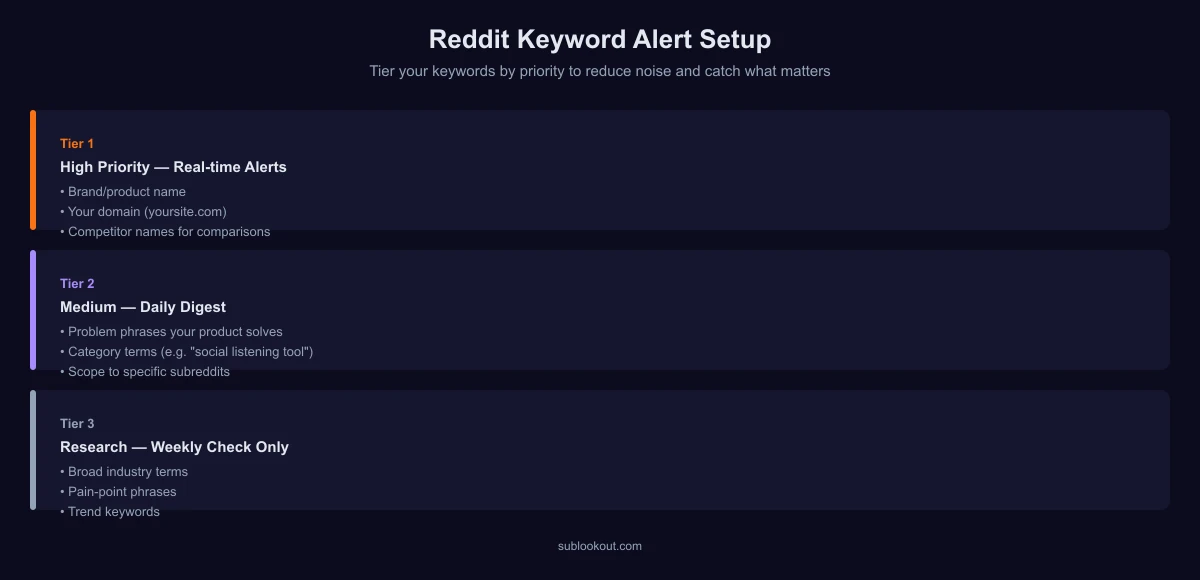
Step 2: Build Your Keyword List in Tiers
Tier 1 — High Priority (Always Alert)
- Your exact product or brand name
- Your domain (e.g., "sublookout.com")
- Your founder's name if publicly associated with the product
- Competitor names you want to monitor for comparison posts
Tier 2 — Medium Priority (Alert With Subreddit Filter)
- Generic problem phrases your product solves — e.g., "reddit monitoring", "keyword alerts reddit"
- Category terms — e.g., "social listening tool", "brand monitoring software"
- These generate more volume, so scope them to specific subreddits rather than all of Reddit
Tier 3 — Research Only (Check Weekly, Don't Alert)
- Industry terms and trend keywords
- Broad pain-point phrases that apply to many tools, not just yours
- Competitor categories where you're not the clear alternative
Keeping these tiers separate prevents your inbox from filling with Tier 3 noise while you're trying to respond to Tier 1 brand mentions.
Step 3: Choose Your Subreddits Carefully
Monitoring all of Reddit for your brand name is usually fine — the volume is low and the signal is high. But for Tier 2 keywords, you need to be selective.
A good starting list for a B2B SaaS product:
- r/SaaS, r/startups, r/entrepreneur — where founders talk about tools they use
- r/marketing, r/digital_marketing — if your product relates to marketing
- Subreddits for tools you compete with or integrate with
- Job-title-specific subreddits (r/productmanagement, r/devops, etc.) relevant to your ICP
Tip: Reddit's own search shows which subreddits a topic is discussed in. Sort by "Top" and "All time" — the subreddits in the results are your highest-value monitoring targets.
Step 4: Set Alert Frequency
Real-time alerts (within minutes) are valuable for Tier 1 keywords — brand mentions can go sideways fast, and responding while a thread is active matters. For Tier 2 and research keywords, daily or weekly digest summaries are usually enough and create far less noise.
In Sublookout, you can set per-monitor alert frequency. Configure Tier 1 monitors as instant alerts, Tier 2 as daily digest, and Tier 3 as weekly.
Step 5: Tune After Two Weeks
No keyword list is right the first time. After two weeks of running, review your alerts and ask:
- What am I ignoring? — If you're routinely dismissing certain keyword matches, either remove that keyword or narrow it to specific subreddits.
- What am I missing? — Check Reddit manually once for your brand. If you find mentions that didn't generate alerts, add those keywords or subreddits.
- What's generating the most useful alerts? — Double down there. Add related keywords. Expand the subreddit list for that topic.
Effective monitoring is a tuning process, not a one-time configuration.
Set up your first Reddit keyword monitor
Sublookout monitors Reddit 24/7 and sends instant or digest alerts when your keywords appear. Takes under 2 minutes to set up.
Start monitoring free See how it works →Common Mistakes to Avoid
- Monitoring too many keywords at launch — start with 3–5 and expand as you learn what's useful
- Using overly generic keywords — "marketing tool" monitors all of Reddit for two common words; you'll get hundreds of irrelevant results
- Not monitoring competitors — competitor mentions are often where switching intent is highest
- Setting everything to real-time alerts — alert fatigue causes people to turn off notifications entirely; tier your frequency
- Forgetting to check delivery — verify that alerts are arriving in your inbox or Slack after setup, before assuming the monitor is working